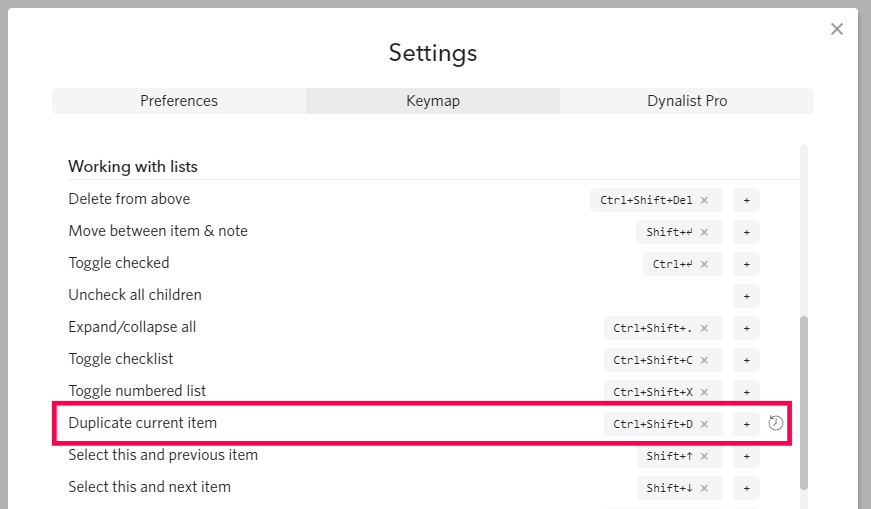
Another outlining program (that shall not be named) allows for duplicating an entire outline from a choice in the dropdown menu for each line. I do it as a back-up or if I want multiple instances of the same sub-outline of an outline.
Right now the only choices are to expand all and copy then paste or exporting to OPML file and re-importing.
Can we get “Duplicate” in the dropdown? Just sayin’
Thanks!
Tim
Hi @Tim_Mundorff! If I understand what you’re trying to do, there’s a keyboard shortcut for duplicating an item (see below). I have mine set to Ctrl-Shift-D.
1 Like
Craig,
Ah!! Thanks!!!
I shall spend more time with the Settings page.
Have a great day!!
Tim
1 Like
Craig,
And while I’ve got you on the phone, so to speak, have you found a way to do “Find and Replace?”
I found a way to do it in Workflowy using a recommended Chrome extension but it doesn’t seem to work with Dynalist. It does search and replace but then the page freezes. I close it and re-open and my changes have returned to the original text I was trying to replace.
Thanks
Tim
@Tim_Mundorff, no, I don’t know of any way of doing general find-and-replace in Dynalist. I can rename tags in the tag-bar on the left, and it will automatically rename all tags.
But if I need heavy-duty regex search or text modification, I have to export the tree to OPML, edit it in my favorite text editor, then re-import it into Dynalist. It works fine, but it’s a little clunky. If there’s a better way, I don’t know what it is.