Please consider adding the ability to copy nodes (and their children) on mobile. On desktop this can be done by Ctrl-dragging a node, but on mobile this seems to be impossible.
This is important to me because I have a daily template I copy each morning. I’m not always at my desktop when I want to set up my day.
Perhaps this could be accomplished using an active similar to “Move” - a button that allows you to search for the node that will be the parent of the new copy.
Craig’s solution is impossible with iPhone because (Apple’s mean and) software keyboards are not allowed to support control keys.
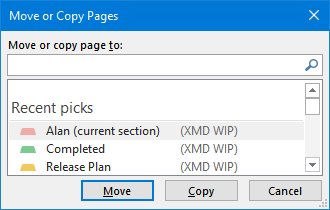
I propose instead something that should be very simple to implement:
This is a OneNote picture, but you could easily add the same Copy button to the dynalist move command and since Mobile has the move button it would just work.
My motive for the command is the same as Craig’s: copying a template.
This really is the one and only feature I really want on Mobile. I like using the phone as a portable todo list, and having the ability to copy predefined tasks is necessary.
Have some way to achieve this and I shall be contented.
Another easy way to provide this is to offer a Duplicate command. Whatever the current node is, make an exact copy (including children). Then I can move the copy.
This is one of my two major issues with Dynalist. Like others here I want to use duplication as part of my regular workflow. Unfortunately Craig Oliver’s method doesn’t seem to work with my keyboard, but even if it did, having to switch to Chrome instead of using the app would be a large cost to pay.
Alan’s second suggestion makes the most sense to me – have a command to duplicate the current item on mobile, which works exactly like the desktop command; then you can move the item using the move command, if desired.
@Alan, I thought it was in the menu, but I guess I just created a shortcut for it like Craig suggests above. However, even without an additional shortcut, it’s not really an issue for me on the full web app because I can just select the nodes I want to duplicate (Shift-Up or Shift-Down), copy them (Ctrl-C) and paste them where I want them (Ctrl-V).
I too would love a solution to this that works on IPhone. Maybe I misunderstand - but currently I can’t find a way to do this.
Similar to above, I have template I copy down every day. And often just like to move things around and it makes it very difficult to do this currently. Thanks!
Oh damn! This is perfect (just read about it online after your prompt).
That said, I don’t currently see this option on my iphone app as I the info seems to imply its a pro feature. Oddly, while my forum posts indicate I am a pro member, I am not (my pro subscription lapsed a few months back) – but I will sign up now. This feature is definitely a game changer for me.
Thanks Kerim.
Edit: Just tried this after updating my subscription. YES! works perfect. Also — the added functionality of editing the toolbar is wonderful. Thanks so much. This is like the tech equivalent of returning from the restroom to discover your food is waiting for you at your favorite restaurant. THANKS!!!